The Technology Behind Seamless Live TV Streaming on Mobile Devices

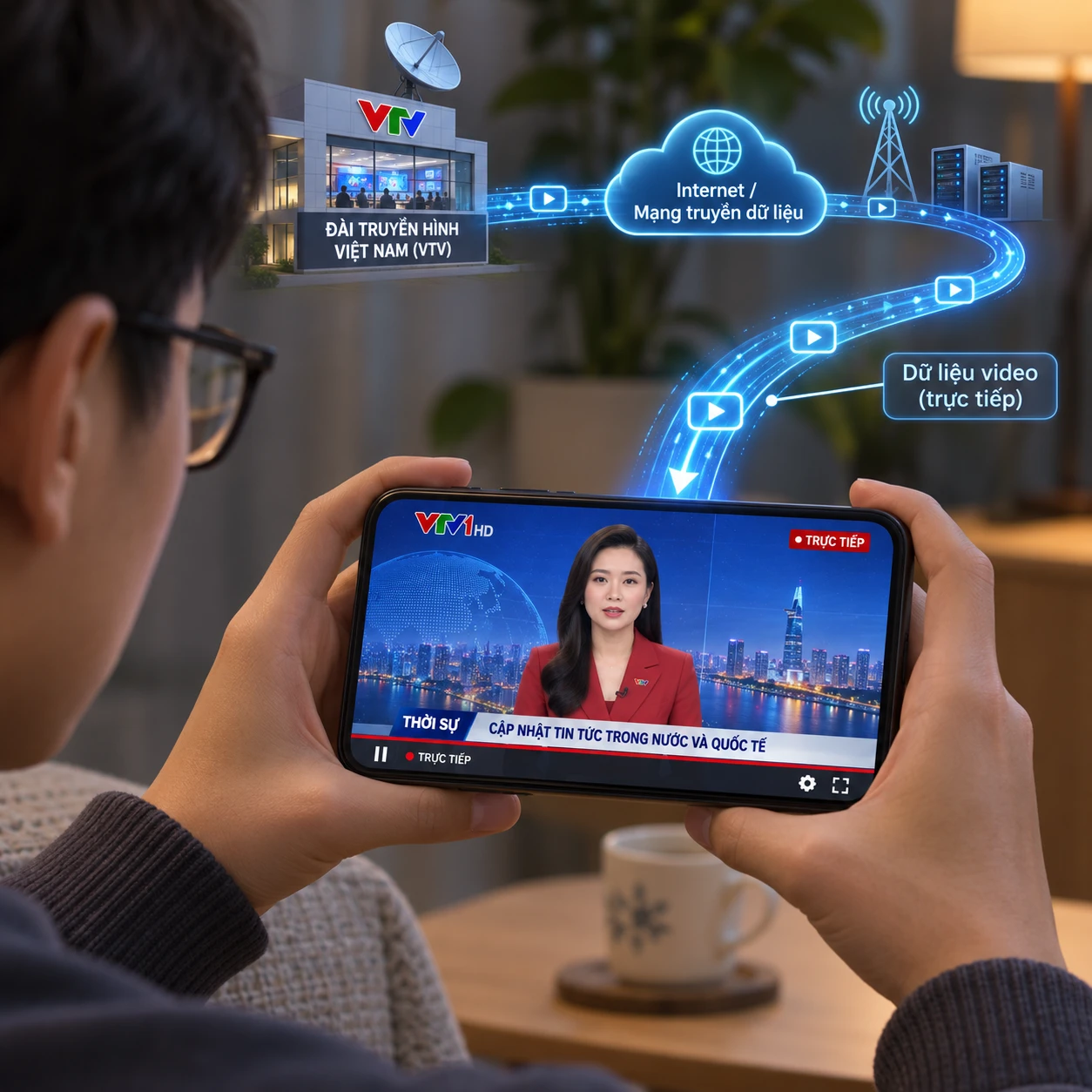
Watching Vietnamese live TV on a phone can feel immediate: open a channel, tap play, and the program appears. Behind that simple action, a stream is captured, compressed, split into small media segments, sent across networks, and rebuilt by a mobile video player. Each part must work with changing internet conditions and different devices.
Understanding this chain helps explain why video quality sometimes changes, why a stream may pause, and what viewers can do to improve playback. The same technology supports live news, sports, entertainment, and other Vietnamese live TV channels on mobile devices.
From TV broadcast to mobile stream
A mobile live TV stream begins with a broadcaster’s live program signal, which is prepared and converted into digital video formats that phones can play. The stream is then packaged for internet delivery, rather than sent to a phone as one continuous, unbroken file.
The broadcaster or streaming provider receives the live feed and prepares it for online distribution. This can involve converting the source signal, adding audio and captions, and creating versions suitable for different screen sizes and connection speeds. The resulting stream is divided into short segments, with timing information that lets the player keep picture and sound in sync.
Protocols such as HLS (HTTP Live Streaming) and MPEG-DASH describe how a player requests and presents these segments. Both can support live delivery over standard web infrastructure. The app usually selects the compatible format based on the device and the service’s setup.
When someone opens a Vietnamese live TV channel, the app contacts the streaming service, receives a playlist or manifest describing the available segments, and starts requesting them. That work happens repeatedly while the broadcast continues. A live stream therefore behaves more like a constantly refreshed sequence than a single download.
Encoding and adaptive bitrate streaming
Live video encoding compresses the broadcast so it can travel efficiently, while adaptive bitrate streaming changes the selected video quality to suit the viewer’s available bandwidth. Together, they help mobile viewers keep watching when network conditions vary.
Raw video contains far more information than a typical mobile connection can carry in real time. An encoder reduces the data size using a video codec, such as H.264 or HEVC, while aiming to preserve detail and smooth motion. Audio is compressed separately, then synchronized with the video. More compression can reduce bandwidth use, but may make fine details or fast-moving scenes look less clear.
Streaming services commonly encode the same program at several bitrates and resolutions. A mobile player measures how quickly segments arrive and estimates whether the current connection can support the next one. It can then choose a higher- or lower-quality version. This process is called adaptive bitrate streaming (ABR).
For example, a viewer watching a football match on cellular data may see the picture become softer as reception weakens. The player can move to a lower bitrate before the stream stalls, then raise quality again when bandwidth improves. It is a practical compromise: lowering quality can preserve continuity, but the picture may not remain at its sharpest resolution.
Bandwidth is the amount of data a connection can carry over time; latency is the time data takes to travel between the service and the device. ABR mainly responds to available bandwidth and delivery performance. It cannot remove every interruption, especially when a connection drops suddenly or remains unstable.
How CDNs deliver live TV to viewers
A content delivery network (CDN) distributes stream segments through servers in multiple locations, helping mobile devices fetch video from a nearby or well-connected delivery point. This reduces the need for every viewer to retrieve each segment from one central origin server.
When a viewer presses play, the app typically reaches a CDN through the streaming service’s delivery setup. The CDN routes requests to an appropriate edge server, which may already have the relevant live segments or can obtain them from the origin. The phone then downloads each segment as the broadcast progresses.
This distributed approach helps manage high demand. If many people tune in to a major Vietnamese news event or a popular live match, a CDN can serve requests across many servers rather than concentrating all traffic in one place. It can also reduce the distance data travels, although the actual route depends on the provider, internet service provider, and current network conditions.
A CDN is not a guarantee against buffering. Congestion between the edge server and a viewer, a weak Wi-Fi signal, or a busy cellular cell can still slow delivery. Choosing a nearby server helps only when the route and connection to it are healthy.
The mobile app’s role in smooth playback
The mobile video player coordinates segment requests, buffering, decoding, and display, while the app manages channel selection and device compatibility. Smooth playback depends on this software working efficiently with the phone’s operating system and hardware.
The player keeps a small reserve of upcoming video in a buffer. If a segment arrives late, that reserve can bridge a brief slowdown. A larger buffer may make playback more resilient, but it can also increase the delay between the live broadcast and what appears on screen. For a live channel, the app must balance resilience with freshness.
Once segments arrive, the device decodes compressed video and audio and displays them in sequence. Phones differ in supported codecs, processing power, memory, and battery capacity. A compatible app can select a suitable stream and use hardware decoding where available. Older devices may struggle with high-resolution video, particularly when other demanding apps are running.
App performance matters at the edges of the experience, too. A clear channel list, quick startup, and reliable recovery after a brief network interruption make live TV easier to use. However, an app cannot compensate fully for an unsupported codec, an overloaded device, or a connection that cannot sustain the selected stream.
Managing network changes and latency
Live streaming responds to network changes by adjusting bitrate, waiting for buffered segments, or reconnecting after an interruption. Moving between Wi-Fi and cellular networks can keep a stream available, but the switch may briefly disrupt playback or change picture quality.
Wi-Fi and cellular networks have different strengths. Home Wi-Fi may offer steady capacity, but signal quality can fall in a distant room or on a congested channel. Cellular data can work well on the move, yet performance varies with reception, tower load, building materials, and data-plan limits. The relevant measure is not the label on the connection; it is whether that connection can deliver the stream consistently.
Latency describes the delay between the event and the picture on the phone. Standard live streaming often uses a buffer to reduce interruptions, which adds delay. Low-latency delivery uses shorter segments or other techniques to shrink that buffer, but it can be more sensitive to network variation. A service may choose a middle ground rather than prioritizing the lowest possible delay.
Automatic switching between Wi-Fi and cellular data is convenient, but it is not always seamless. The phone may pause while the app re-establishes requests, and cellular viewing may consume mobile data. For a long program, check the app’s data settings and your plan before relying on an automatic handoff.
Tips for a better live TV experience
To improve live TV playback on a phone, start with the connection, reduce avoidable device load, and keep the app current. These steps can help, though they cannot guarantee uninterrupted streaming when the network or service is experiencing problems.
- Use a stable connection. If Wi-Fi is weak, move closer to the router or try a reliable cellular connection. A strong signal is more useful than simply being connected to Wi-Fi.
- Limit competing traffic. Large downloads, cloud backups, or other video streams on the same network can reduce bandwidth available to live TV.
- Check the app and operating system. Updates can address compatibility and playback issues. Install them through the device’s official app store.
- Close demanding background apps if the phone is older, overheating, or struggling to decode video. This may free processing resources, though it will not fix a poor network.
- Choose a lower quality setting if the app offers one and the stream keeps pausing. A less detailed picture may play more consistently on a limited connection.
- Review mobile-data use. Higher video quality generally uses more data. When watching away from Wi-Fi, check your plan and the app’s playback settings.
If the picture still stalls, test another network or reopen the channel once. If several channels fail on different connections, the issue may be with the service rather than the phone. That distinction can save time spent changing device settings that are already working correctly.
Why does live TV sometimes buffer on a phone?
Buffering happens when video segments arrive too slowly to keep the player supplied. Weak Wi-Fi, cellular congestion, limited bandwidth, device performance, or a temporary service disruption can all contribute.
Does streaming quality change with network speed?
Usually. Adaptive bitrate streaming can lower resolution or bitrate when delivery slows, then raise quality when conditions improve. The exact behavior depends on the app and available stream versions.
Is Wi-Fi always better than mobile data?
No. A strong cellular connection may outperform weak or congested Wi-Fi. Compare stability and signal quality, and consider mobile-data limits before watching a long program.
Can viewers reduce live-stream delay?
Sometimes, if the app offers a low-latency option. Lower delay can leave less buffered video available to absorb network slowdowns, so playback may become more sensitive to connection changes.